Flight Simulator Games: Benefits and Limits for Aspiring Pilots
Flight simulator games can help aspiring pilots learn cockpit layout, radio calls, instrument scanning and basic procedures, but time spent on a home PC does not count toward a DGCA licence or flying hours. Only approved flight simulation training devices (FSTDs) can be used for credit.
Used well, a home simulator is a cheap, low-pressure way to build familiarity before ground classes and real training. Used badly, it can create bad habits. This guide covers the benefits, the limits and a sensible way to practise.
Updated October 2026 · Editorial team, Golden Epaulettes Aviation
Key facts: flight simulator games
- Best for: learning cockpit flows, basic instrument interpretation, radio phraseology and procedures.
- Not for: logging flight hours or replacing an approved simulator or aeroplane.
- Popular titles: Microsoft Flight Simulator, X-Plane and similar PC simulators.
- Official training devices: FSTDs approved by the regulator (flight training devices and full flight simulators).
- Cost angle: a basic setup can be a laptop, joystick and rudder pedals; see our flight simulator training cost guide.
- Next step: add structured learning through DGCA ground subjects.
Do flight simulator games help future pilots?
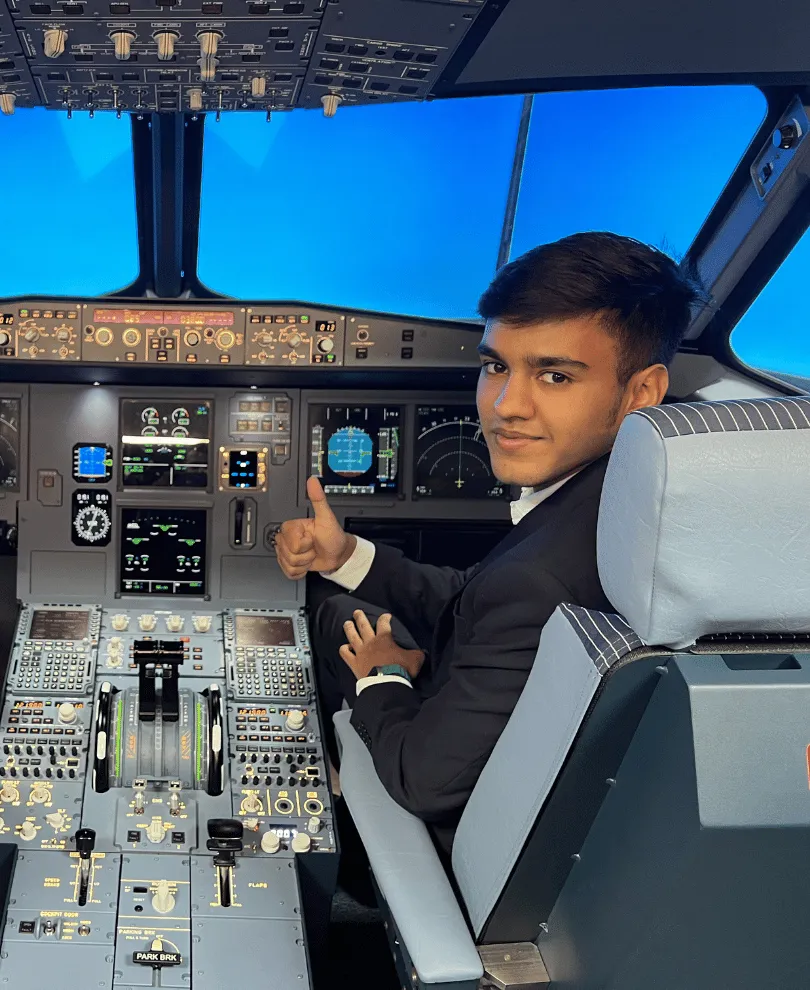
Yes, in specific ways. Sitting in a virtual cockpit builds comfort with instruments and switches, and lets you repeat an approach or a checklist many times without cost.
Professional pilots use certified simulators every few months for checks and emergency training, which shows the value of simulation. A game on a laptop is not the same thing, but it can prepare your mind for the real devices you will use later.
Key benefits of flight simulator games
- Cockpit familiarity: learn where the primary flight display, navigation display and autopilot controls are before you see a real one.
- Instrument scanning: practise the attitude indicator, airspeed, altimeter and heading cross-check that every pilot needs.
- Radio phraseology: online networks such as VATSIM and IVAO provide volunteer air traffic controllers, which helps you practise standard calls.
- Procedure memory: repeat checklists, circuits and instrument approaches until the sequence becomes natural.
- Weather and navigation awareness: see how wind, cloud and visibility change a flight plan.
- Motivation: many students report that regular simulator practice keeps them engaged during long ground-study periods.
Limits: what games cannot do
A game is not a calibrated training device, and it cannot reproduce motion, real aircraft handling or the pressure of a live flight. Some simulators are also easier than the real world in turbulence, engine failures and weather.
| Feature | Home PC simulator | Approved FSTD / full flight simulator |
|---|---|---|
| Counts toward licence or type rating | No | Yes, in the amount allowed by the regulator |
| Motion and visual accuracy | Limited, consumer hardware | Certified to defined standards (see ICAO Doc 9625) |
| Instructor and debrief | None, unless you arrange one | Qualified instructor, structured syllabus |
| Aircraft data | Often approximate | Manufacturer-validated data for specific types |
| Cost | Low, one-off hardware cost | High hourly cost |
Regulators approve training devices under defined standards. For background, see the ICAO manual criteria and DGCA guidance; you should confirm what hours count with the regulator before assuming anything.
How to practise with a simulator the right way
- Start with a simple aircraft such as a light single-engine piston and learn straight and level flight, turns, climbs and descents.
- Use realistic settings: real weather, a proper flight plan and no pause-and-restart for mistakes.
- Learn the basics of the instruments through a structured source, for example our guide to flight simulator basics.
- Fly standard circuits and instrument approaches, then add radio calls on an online network.
- Compare your flights with real aviation material and, once enrolled, with your instructor's advice.
- Avoid practising unusual habits such as unrealistic manoeuvres, which can carry over to real flying.
Software choices and requirements are covered in flight simulator software.
Choosing hardware and a budget
You do not need an expensive cockpit to begin. A computer that meets the simulator's published requirements, a joystick or yoke and, later, rudder pedals cover most needs.
- Entry level: laptop or desktop, a basic joystick and keyboard shortcuts.
- Intermediate: yoke, throttle quadrant and rudder pedals for better control feel.
- Advanced: multiple screens, panels and head tracking for a more immersive view.
Prices change often, so compare current offers. Spend on structured learning before spending heavily on hardware.
Using a simulator for ATC and airline prep
Airlines usually run simulator assessments for cadet candidates, and the aim is to test aptitude, multi-tasking and attitude, not prior game experience. A basic familiarity with instruments can reduce stress, but many airlines deliberately test people who have never touched a simulator.
The sensible approach is to treat games as a hobby support and rely on structured preparation. See airline preparation classes and our overview of simulator training for CPL for how simulation fits into formal training.
What this means for your pilot career
If you enjoy flight simulation, that is a good sign of interest, but the licence route is separate and fixed by DGCA. Begin with how to become a pilot, arrange a Class 2 medical early, and prepare for DGCA CPL ground classes.
Before any serious training, make sure you are medically fit. Read about the Class 1 medical requirements, since a medical failure cannot be fixed by simulator experience.
Sources and official references
- ICAO – Flight simulation training devices (Doc 9625) – icao.int (accessed October 2026)
- Directorate General of Civil Aviation – dgca.gov.in (accessed October 2026)
- Flight simulator – Wikipedia (accessed October 2026)
- Microsoft Flight Simulator official site – flightsimulator.com (accessed October 2026)
- EASA – easa.europa.eu (FSTD certification specifications) (accessed October 2026)
Next steps
Enjoy simulators and thinking about a real career? Talk to us for free counselling on medicals, DGCA ground classes and airline selection.
Talk to a counsellor on WhatsAppReviews & Discussion
Write a review
No reviews yet. Be the first!