Flight Simulator Basics: A Beginner's Guide to Simulators
A flight simulator is a system that recreates how an aircraft behaves, how its instruments respond and what the environment looks like. Beginners usually start with desktop software and a joystick, while airlines and approved training organisations use certified full flight simulators.
Updated October 2026 · Editorial team, Golden Epaulettes Aviation
This guide explains the types of simulator, the controls and instruments you will meet, and a few starter exercises. It also clarifies what a home setup can and cannot do for a future pilot.
Key facts
- Definition: a device or software that reproduces aircraft handling, systems and environment for practice.
- Beginner route: desktop simulator software with a joystick or yoke, rudder pedals and throttle.
- Professional route: regulator-qualified training devices, including full flight simulators (FFS).
- Training credit: only devices approved by the regulator count toward licence or rating requirements.
- Best beginner use: learning the instrument scan, checklists, radio phraseology and procedures.
- Not a substitute for: real flying hours and DGCA theory exams.
What is a flight simulator?
A simulator models aerodynamics, engines, systems and weather, then feeds the result back to you through screens, instruments and, in professional devices, motion. The better the model and the hardware, the closer the experience to real flying.
Simulators let pilots practise things that are risky, rare or expensive in an aircraft, such as engine failures, instrument approaches in poor weather and emergency checklists.
Types of flight simulators
| Type | What it is | Typical use |
|---|---|---|
| Desktop / home simulator | Consumer software on a PC with optional joystick, pedals and throttle | Learning layout, instruments and procedures |
| Flight training device (FTD / FNPT) | Regulator-qualified device with a fixed cockpit but often no full motion | Instrument and procedure training in approved courses |
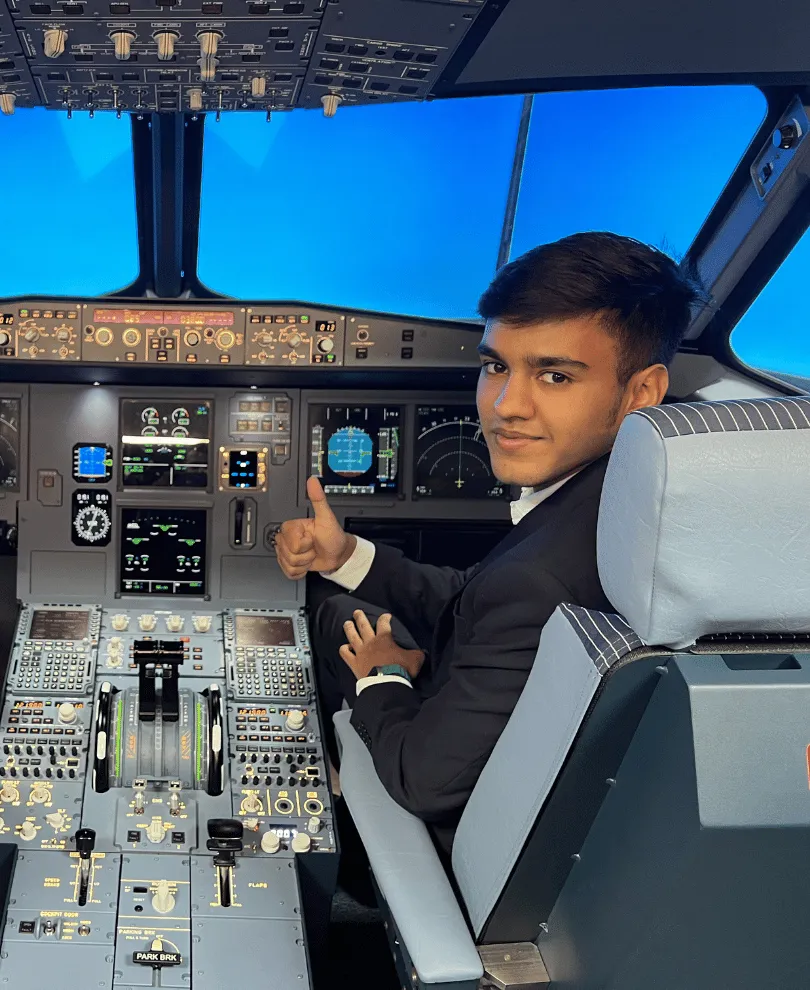
| Full flight simulator (FFS) | Replica cockpit on a motion platform with high-fidelity visuals | Airline type ratings, recurrent checks and emergency training |
| VR set-up | Virtual reality headset on a PC simulator | Cockpit familiarisation and spatial awareness |
Qualification levels for professional devices are set by regulators such as DGCA, EASA and the FAA under ICAO standards. Always check that a device is approved before expecting training credit. For software options, see our guide to flight simulator software.
Basic parts of a flight simulator
- Primary controls: yoke or joystick for pitch and roll.
- Rudder pedals: yaw control and nosewheel steering on the ground.
- Throttle quadrant: engine power, and often flaps, speed brakes or propeller levers.
- Displays: one or more monitors, projection or a VR headset.
- Avionics: instruments and autopilot panel, simulated or physical.
You can begin with a basic joystick and learn well. Add pedals and a throttle only once you understand why you need them.
Cockpit instruments you will learn first
Most light-aircraft cockpits are built around six core instruments, often called the basic six: airspeed indicator, attitude indicator, altimeter, turn coordinator, heading indicator and vertical speed indicator. Larger aircraft combine these into electronic primary flight displays.
Learning to scan them in a steady pattern, rather than staring at one, is the single most useful habit a simulator can teach. It is also a topic you will meet in instrument theory during your DGCA studies.
Starter exercises for beginners
- Learn the controls and the effect of each: pitch, bank and power, one at a time.
- Fly straight and level at a fixed altitude and heading for five minutes.
- Practise climbs, descents and level-offs with gentle control inputs.
- Fly standard-rate turns holding altitude.
- Fly a simple circuit and landing in clear weather, then repeat with wind.
- Add radio calls and checklists once the handling feels natural.
Common beginner mistakes
- Over-controlling: large, quick inputs cause oscillation. Make small corrections and wait for the result.
- Chasing the airspeed or altitude needle instead of fixing pitch and power first.
- Skipping checklists because it is only a simulator. Build the habit now.
- Practising only landings, ignoring navigation and instrument flying.
- Assuming a home simulator trains you to handle real turbulence, fatigue or pressure.
If you want a fun but realistic introduction, our page on flight simulator games and their benefits explains where games help and where they stop being useful.
How simulators fit professional pilot training
In a DGCA-approved training pathway, approved simulator time can be used alongside aircraft flying for certain exercises, subject to DGCA rules. Airlines use full flight simulators extensively for type ratings, recurrent checks and emergency practice, and many candidates face a simulator assessment during selection.
For costs and what to expect from paid sessions, see flight simulator training cost. For how simulators relate to the licence, see our page on the commercial pilot licence simulator requirement, and for an example of a type-specific course, see Boeing 787 flight simulator training.
What this means for your pilot career
A home simulator is a good way to test your interest and learn the language of the cockpit before spending on training. It will not replace the DGCA theory papers, the medical or flying hours.
If you are serious, start with the DGCA CPL ground classes for the theory, understand the commercial pilot licence route, and use our airline preparation classes when you reach simulator assessments. Our ground classes cover theory and selection preparation, not flying hours.
Sources and official references
Next steps
Curious how simulator skills connect to DGCA exams and airline selection? Speak to our team for free counselling on theory classes and simulator-assessment preparation.
Talk to a counsellor on WhatsAppReviews & Discussion
Write a review
No reviews yet. Be the first!